Features
Explore all the features of The Box platform
Features
The Box platform provides powerful features to enhance your development workflow.
Multiple GitHub Accounts
Connect and manage multiple GitHub accounts from a single The Box account. Switch between accounts seamlessly when creating tasks.
How to use:
- Go to Settings page
- Find GitHub Integration section
- Click the Configure button
- On the GitHub page, you can:
- Add a new GitHub account
- Add or remove repository access for existing accounts
- After making changes, return to The Box and your accounts will be updated
GitHub Authentication
Sign up and log in to The Box using your GitHub account for a faster and more secure authentication experience.
Benefits:
- One-click registration
- No need to remember another password
- Automatic profile setup
PWA Support
Install The Box as a Progressive Web App on your device for a native app-like experience.
How to install:
- Open
https://the-box.devin your browser - Click the install icon in the address bar (or use browser menu)
- Click Install
Now you can access The Box directly from your home screen or app drawer.
Draft Tasks
Save your task ideas as drafts and come back to them later. Perfect for when you want to plan tasks but not execute them immediately.
How to use:
- Fill out the task form
- Click Save as Draft instead of Create Task
- Find your drafts in the Drafts section
Scheduled Tasks
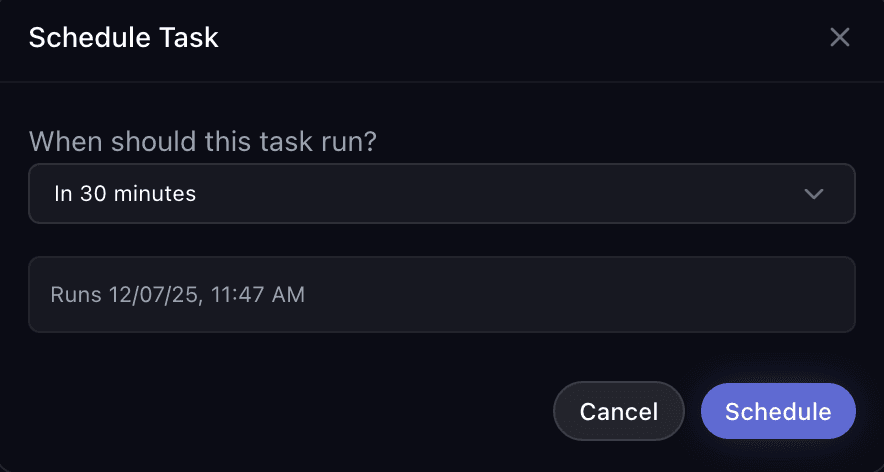
Schedule tasks to run at a specific time in the future. Great for planning work ahead or running tasks during off-hours.
How it works:
When creating a task, you can choose to schedule it for later instead of running it immediately. Simply select a delay time and your task will be queued to start at that time.
Available schedule options:
- 15 minutes — Run the task in 15 minutes
- 30 minutes — Run the task in 30 minutes
- 1 hour — Run the task in 1 hour
- 2 hours — Run the task in 2 hours
- 4 hours — Run the task in 4 hours
How to schedule a task:
- Fill out the task creation form
- Instead of clicking Create Task, click the dropdown arrow
- Select your preferred delay time
- The task will be created with "Scheduled" status
- When the time comes, the task will automatically start
Use cases:
- Plan tasks to run during lunch break
- Queue multiple tasks to run one after another
- Schedule non-urgent tasks for later
Analytics Page
Track your usage statistics and task history with the new Analytics page.
Available metrics:
- Total tasks created
- Tasks by status (completed, failed, in progress)
- Usage over time
- Repository statistics
Access the Analytics page from the main navigation menu.
Real-time Agent Monitoring
Watch Claude work on your tasks in real-time with improved visualization.
What you can see:
- Live code changes
- File operations (read, write, edit)
- Agent's thinking process
- Tool usage in real-time
The improved UI makes it easier to follow along and understand what the agent is doing at each step.